A Mac can't run a Windows .exe by itself — but with a translation layer it can, often at full speed. Here's the safe way to do it.
You've downloaded a Windows program and macOS is showing it as a document it can't open. That's because a .exe is a Windows executable and a .msi is a Windows installer package, and neither means anything to macOS by itself.
What you need is a Windows compatibility environment to open it inside, and on an Apple Silicon Mac that's Bourbon 26.
The direct way
With Bourbon 26 installed, a Windows file has two routes.
- Windows Apps tab. Open Bourbon, go to Windows Apps, point it at the file.
- Finder. Right click the
.exeor.msiand choose Open With, then Bourbon. macOS remembers it after that.
Installers run inside a Wine prefix and put things where they expect them. Once it's installed, the program shows up in Bourbon's app list and launches from there.
Always prefer the installer over the loose executable. Copying a bare .exe across without running its .msi is the number one cause of "it just doesn't work". The program's missing the DLLs the installer would have put next to it.
Which programs are worth trying
Good candidates. Self contained desktop utilities, older business software, forms based line of business clients, portable tools. Small, offline, no license server, no kernel driver.
Bad candidates. Anything with hardware locked licensing, heavy GPU needs, or a dependency on real Windows services. Big licensed CAD and accounting packages belong in a virtual machine, and we say so in the app rather than letting you find out the slow way.
The shortcut
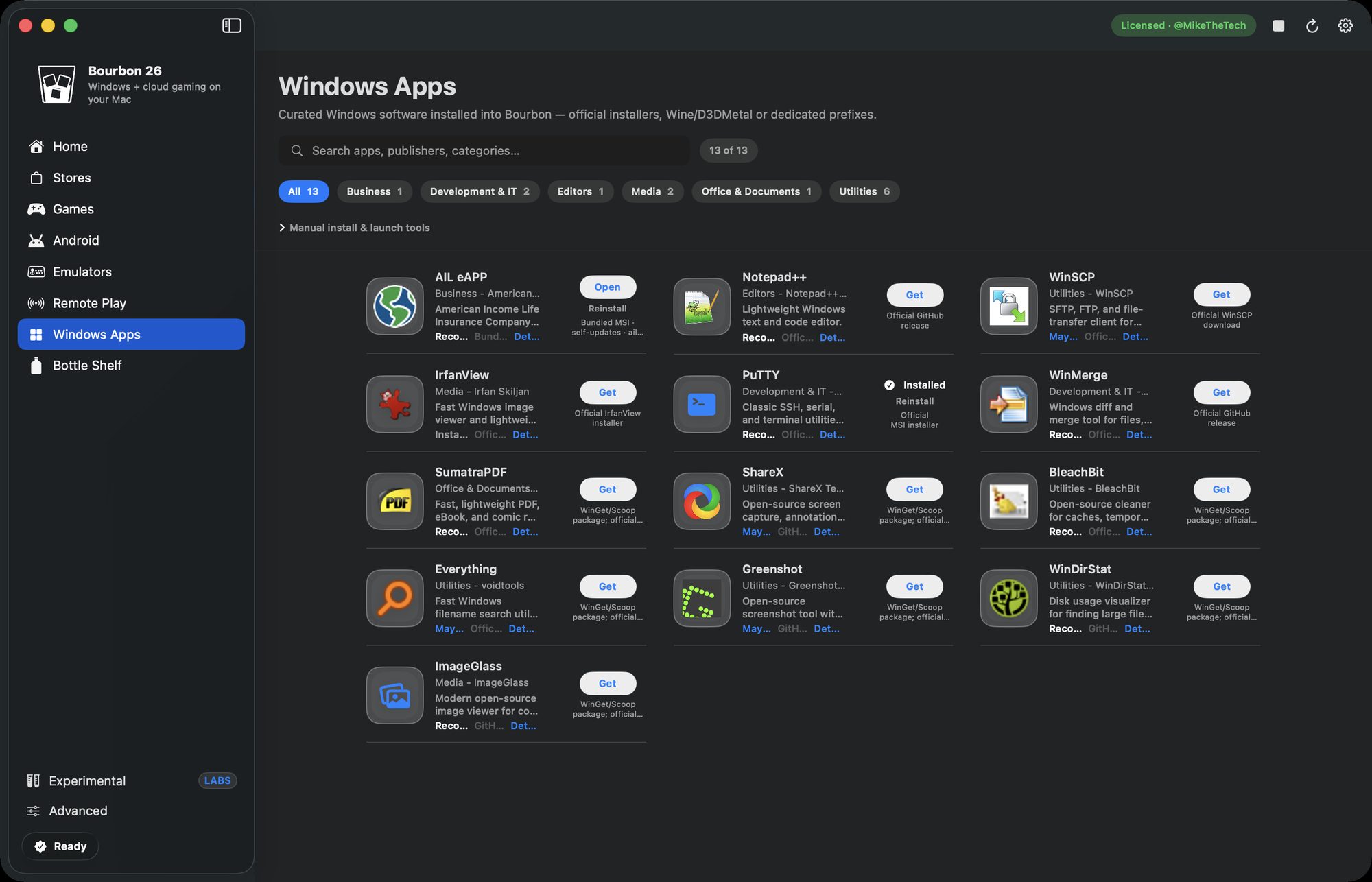
Bourbon ships a catalog of Windows apps it can install straight from each project's official source, so there's no download hunting. It's got Notepad++, PuTTY, WinSCP, WinMerge, SumatraPDF, IrfanView, ImageGlass, ShareX, Greenshot, Everything, WinDirStat and BleachBit, plus specialist entries like the AIL eAPP insurance client.
The catalog is deliberately Windows only. Anything with a real Mac build gets left out, because installing the Mac version is always the better move.
What about the alternatives?
CrossOver handles standalone Windows apps well and has a bigger tested database for productivity software, but it's $74 a year and it won't set Steam up alongside them. Parallels runs anything at all, at $99.99 a year plus a Windows license, with a full virtual machine booting in the background just to open a small utility.
Bourbon sits in between at $29.99 once. Finder integration, a curated catalog that already knows which programs are worth attempting, and the same install handling your Steam library and your streaming.
Short version
Right click, Open With, done, assuming the program is the self contained kind. Heavy licensed software still wants a VM, but for everything else Bourbon is the cheapest way to get there and it covers your games in the same app.
Buy Bourbon 26, $29.99