Windows games run on a Mac three ways: translation (Wine and Apple's Game Porting Toolkit), streaming, or a virtual machine. Which one is right depends on the game — here's the honest map.
People ask this constantly, and our answer is Bourbon 26, which you'd expect us to say. The more useful version is showing you why, because it comes down to what you actually play.
The 20 second version. Get Bourbon 26. It's the only one of these tools that covers all three cases: it translates your Windows Steam games, routes your native Mac titles to the real Mac Steam client, and streams the anti-cheat ones that can't run locally at all. $29.99 once, no subscription.
Start here: do you even need this?
A lot of people build out a whole Wine setup for a game that already has a Mac build sitting right there on Steam. Of the 24,000 plus titles in our compatibility list, the big majority are native macOS builds. Steam installs them directly and nothing gets translated at all.
So before anything else, look your games up. If they come back native, you're done. Go play.
Windows only? Then you want Bourbon 26
Bourbon runs the actual Windows game and converts what it says into something macOS understands. Windows API calls become macOS ones, DirectX calls become Metal. No Windows license, no virtual machine, no giant disk image eating your SSD.
This covers the big middle of most libraries. Single player stuff, older titles, indie games, anything without kernel level anti-cheat. The annoying part has always been setup. Wiring up Wine, DXVK, MoltenVK, VKD3D and a working Steam install by hand eats an afternoon, minimum.
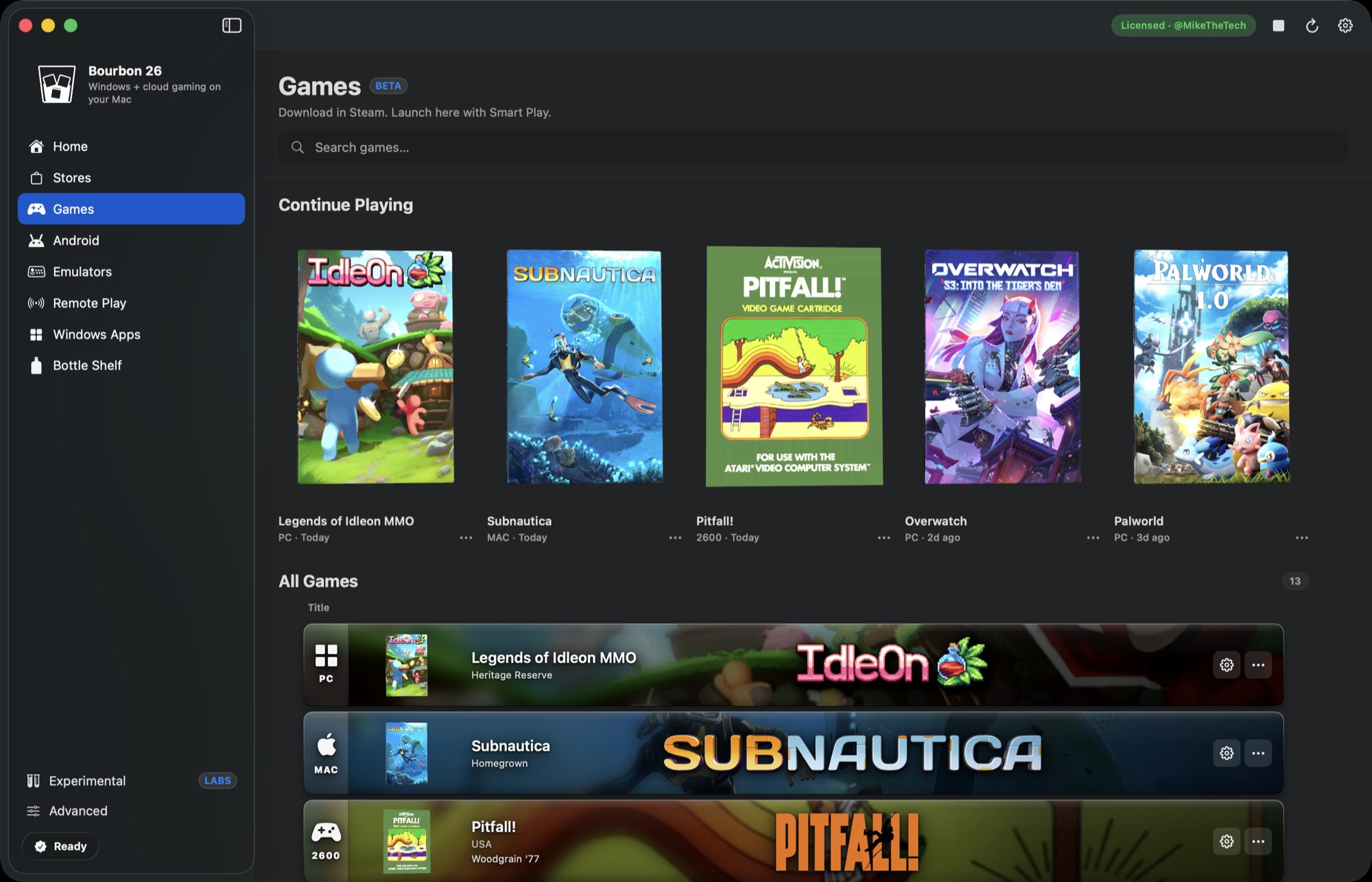
That's the exact problem Bourbon 26 is built to delete. One button installs all fourteen pieces including Steam, then Smart Play picks a graphics path per game so you're not sitting there guessing whether a title wants DXVK or VKD3D or something else entirely.
Anti-cheat games? Stream them
Fortnite, Valorant, Apex, PUBG, Rainbow Six Siege, Destiny 2, Call of Duty. These load a Windows kernel driver to watch for cheats, and macOS can't load Windows kernel drivers. Not "can't yet", just can't. No Wine wrapper or VM changes that.
What does work is streaming, and this is where Bourbon still has you covered. Its Remote Play tab puts GeForce NOW, Xbox Cloud, Amazon Luna and Boosteroid in native windows, adds Chiaki for PS4 and PS5, and Moonlight for streaming off a gaming PC you already own. Same app, same library screen, no second tool to go find.
That's the thing none of the alternatives do. CrossOver, Parallels and Whisky all translate or virtualize and stop there. If a game won't run locally they have no answer for you at all.
What about a virtual machine?
Parallels running Windows 11 ARM is great for business software and pretty rough for games. There's no GPU passthrough on Apple Silicon, so the guest gets a virtual display adapter instead of your actual M series GPU. You also need a Windows license on top of the $99.99 a year.
For gaming, a translation layer talking straight to Metal wins. It isn't close.
What each option costs
| Option | Cost | Best for |
|---|---|---|
| Native Mac build | Free | Anything that has one |
| Bourbon 26 | $29.99 once | Windows only Steam library |
| CrossOver | $74/yr | Cross platform, paid support |
| Apple GPTK on its own | Free | People who like the Terminal |
| Cloud streaming | Subscription | Anti-cheat games |
| Parallels plus Windows | $99.99/yr plus license | Business software, not games |
Competitor pricing checked June 2026.
So what should you do?
Your library is probably a mix of all three: some native Mac builds, some Windows only titles, and a couple that anti-cheat blocks entirely. Bourbon 26 is the only one of these options that handles all three in a single app, and it's $29.99 once with no renewals. Look your games up first, that part's free.
Search your games, free Buy Bourbon 26, $29.99