
Hover for both remaining and used. An over-limit reading shows empty; an unknown one never pretends to be full.
Coming soon
macOS 14+ · Apple Silicon
Windows version too
AI plan usage, at a glance
Know how much fuse you have left.
Fuse brings your AI plan limits into one compact view — remaining capacity, reset countdowns, plan names and credits for Cursor, Claude, ChatGPT/Codex, Gemini and more. It lives in your Mac's menu bar, or in a floating notch you can dock to any edge of the display.
8 AI services
Multiple accounts per service
Notarized by Apple
Sessions stay on your Mac
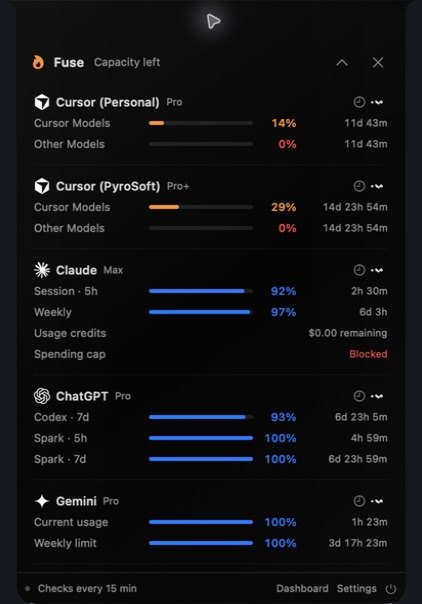
Your usage, where you want it
Menu bar, notch, or window.
Click the gauge in the menu bar for the compact view. Rather keep it on screen? Switch to the floating notch in Settings — drag it to the top, bottom or either side of the display, collapse it to a single flame, or close it and carry on from the tray.
- At the top, the notch makes room for the camera, and the minimized flame fits in the menu bar beside it.
- A standalone dashboard window shows the same view. Past five accounts, search and paging appear.
- Each account has its own menu: refresh it, reconnect it, or open the service's own usage page.
- Respects Reduce Motion and Reduce Transparency.
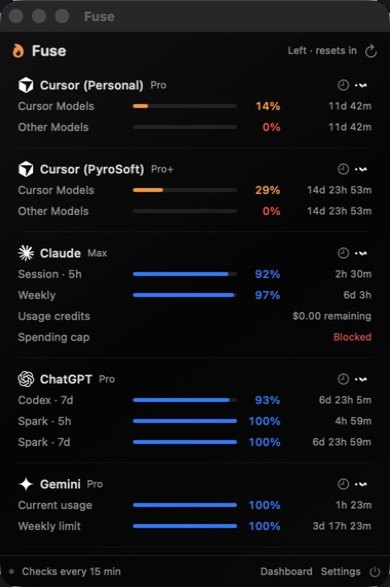
Every row, explained
The bars burn down.
Fuse shows what you have left, not what you've spent — a full bar is a full allowance, and it drains as you use it.
Window names come from the service itself — a five-hour session, a weekly limit, a seven-day Codex window.
A blocked spending cap gets its own label instead of hiding behind a percentage.
Kept on your computer and drawn from what Fuse actually observed — no interpolation, no predictions. It appears after two readings.
It keeps its original timestamp and is marked as a last-known reading, so an outage never passes for a fresh number.
Choose anywhere from 5 to 60 minutes in Settings, or refresh one account by hand. Retry and reconnect are separate actions.
Services
Eight services. One glance.
Available meters depend on the service and your plan. Cursor, Claude, ChatGPT/Codex and Gemini have been checked with signed-in accounts; the other four integrations are experimental.
Current-period usage from the Cursor dashboard. Model percentages stay separate; request quotas get their own meter when present.
Session and weekly windows for your selected organization, plus usage credits and spending-cap status.
Codex windows — primary, secondary, additional-model and code review. Core chat message caps have no self-serve source, so they aren't shown.
Current and weekly limits, read from the rendered usage page — the most fragile integration, since it depends on that page's layout.
Reads Copilot's account data. Only structured quota fields count — page text is never turned into a reading.
Reads session and user data, and shows a meter only when the service returns structured quota fields.
Reads grok.com session and rate-limit data, and shows a meter only when it returns structured quota fields.
Reads windsurf.com session and usage data, and shows a meter only when it returns structured quota fields.
Unofficial by necessity: these services don't publish a consumer usage API, so Fuse reads what each signed-in dashboard already loads. It doesn't count prompts or tokens itself, plan badges are best-effort, and a vendor change can temporarily interrupt readings.
Accounts & privacy
Sign in on their site. Keep the session on yours.
Fuse never sees your password. You sign in on each service's own page inside an embedded browser; Fuse keeps only the session that page sets, and reads the same numbers the service's dashboard already shows you.
- Add the same service more than once — work and personal accounts get separate rows, separate browser profiles and separate sign-ins.
- Saved sessions live in the macOS Keychain and are sent only to the service they belong to.
- Usage history stays on your Mac. Removing an account signs it out and deletes its saved session and history.
- No analytics or tracking in Fuse itself: its own requests go only to the services you connect.
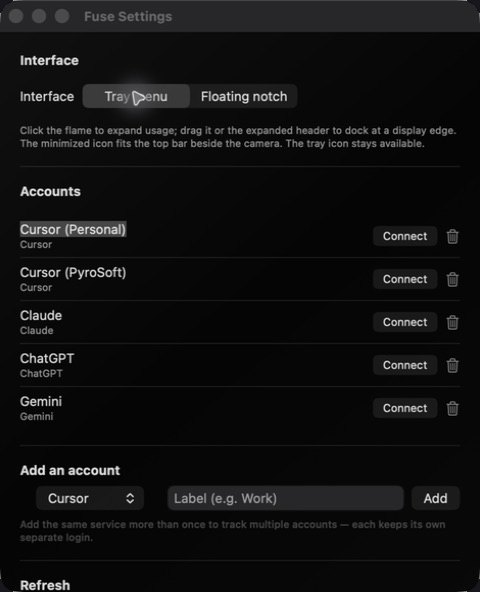
Getting started
Four steps to a full view.
No API keys to paste — you sign in to each service the way you normally would.
Open Fuse
Move Fuse.app into Applications and open it. Its gauge icon appears in the menu bar.
Add your services
Open Settings and add each service you use — the same one twice if you have two accounts, each with its own label.
Connect
Choose Connect and sign in on the service's own site. Fuse keeps the session, never the password.
Pick your view
Stay with the tray menu, or switch to the floating notch in Settings.
Platforms & status
Mac first. Windows too.
Fuse isn't publicly released yet. Here is exactly where each build stands.
| Availability | Coming soon — not yet publicly released. Launch news will be posted on the PyroSoft Discord. |
|---|---|
| Mac | macOS 14 or later on Apple Silicon. There is no Intel build. |
| Current Mac build | 26.9.8.18 — Developer ID signed, notarized by Apple and stapled. |
| Where it lives | The menu bar (no Dock icon), an optional floating notch, and a standalone dashboard window. |
| Windows | Windows 10 or 11, x64 or ARM64, with the Microsoft Edge WebView2 Runtime. The current Windows build, 26.8.26.1, is an earlier release: it runs from the system tray with the same eight services and multiple accounts, and stores sessions encrypted for your Windows user account. It doesn't yet match the Mac build shown on this page: the floating notch, glass interface, dashboard window, remaining-capacity meters and usage history are Mac-only for now. |
| Windows signing | Not Authenticode-signed yet, so SmartScreen may ask before the first launch. No administrator rights needed. |
| Refresh | Every 15 minutes by default; adjustable from 5 to 60 minutes, plus manual refresh per account. |
| You'll need | Your own accounts with the services you want to track, and an internet connection. AI subscriptions aren't included. |
Questions people actually ask
FAQ
Does Fuse see my passwords?
No. You sign in on each service's own page in an embedded browser, and Fuse keeps only the resulting session — in the Keychain on a Mac, encrypted for your user account on Windows — and sends it only to the service it belongs to.
Is Fuse official, or affiliated with these services?
No. Fuse is an independent app from PyroSoft. The services don't offer a consumer usage API, so Fuse reads the same data their signed-in dashboards load. Those endpoints are unofficial and can change without notice.
Does it count my prompts or tokens?
No. Fuse reports what each service's own dashboard reports — it doesn't measure prompts or tokens independently.
Why does ChatGPT only show Codex?
ChatGPT's core chat message caps have no self-serve usage source, so Fuse tracks the Codex windows the service does expose, and says so in the account's details.
Can I track a work and a personal account for the same service?
Yes. Add the service twice. Each row gets its own browser profile and its own sign-in, and you can rename rows to tell them apart.
Will it run on an Intel Mac?
Not currently. The Mac build is Apple Silicon only and needs macOS 14 or later.
When can I get it?
Fuse isn't publicly released yet. Join the PyroSoft Discord for launch news.
Launch news
Coming soon to Mac — and Windows.
Fuse isn't available to download yet. Join the PyroSoft Discord for launch news, or look around at what PyroSoft already ships.